DocsReadiness Score
Check your Readiness Score
Your Readiness Score turns the privacy work your team has recorded in ComplyZero into a score out of 80, and lists the work that would raise it. It's a working view of your records, not a certificate of legal compliance.
Read the video as text
DPDP Readiness turns the privacy work you've recorded in ComplyZero into a score out of 80, and shows what would raise it. Choose the scope: your whole organisation, or a single website. Your score comes with a band, from Low up to Strong. Verified evidence is the share ComplyZero can see for itself, like a published banner. The rest is what your team has recorded. Work needing attention lists what would raise your score, most important first. Each item takes you straight to where you fix it. Further down, six areas show how each one scored, and how much it counts. Why 80? The last 20 points come from a ComplyZero DPDP Audit, where our team checks your records and workflows. When your team finishes some work, select Refresh overview. Earlier results stay under History. And Download PDF gives you a report for your board or an auditor.
Read your score
In the sidebar, under Governance, select Readiness Score. It's part of the Governance Suite, so if it isn't in your plan, the page says so.
Choose the Scope 1: your whole organisation, or one website. Choosing a website scores that website's consent on its own.
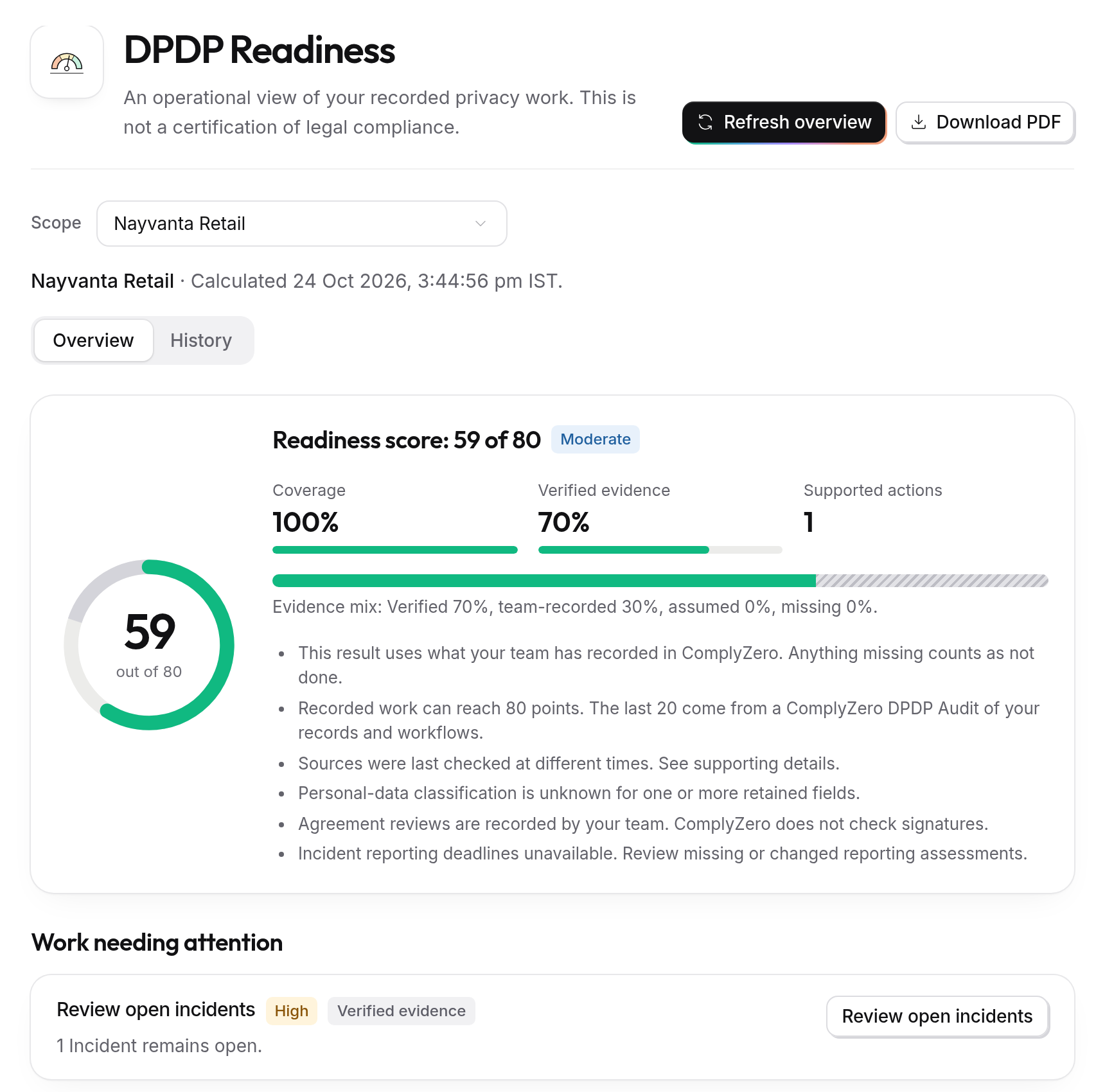
At the top is your Readiness Score 2, with a band to put it in context:
- Strong: 65 or more
- Moderate: 45 to 64
- Developing: 25 to 44
- Low: below 25
Next to it:
- Coverage: how much of the score comes from areas where something is recorded.
- Verified evidence: how much comes from things ComplyZero can see for itself, such as a published banner, rather than information your team typed in.
- Supported actions: how many pieces of work are listed under Work needing attention.
Work needing attention 3 lists what would raise the score, most important first, each with a button that takes you to where you fix it.
Further down, Six category summaries shows how each area scored, and How this result is calculated gives the detail behind the result.
How each area is scored
The score is built from six areas, each with a weight. Anything ComplyZero can't find counts as not done. An area that isn't part of your plan is left out, so it never counts against you.
Consent management (25%)
For your websites, the area rewards a published banner, consent records coming in, and cookies that are all classified, with a little taken off for each cookie still unclassified. For consent you collect on forms and QR codes, it rewards a published purpose, a live form that asks it, and consent records held. If you use both, the area is the average of the two.
See Set up your purposes and Collect consent in person.
Privacy notice (15%)
All or nothing: a published privacy notice for the scope you're looking at. See Publish your Trust Centre.
Request readiness (15%)
Half of this area is for having a way for people to send you requests. The other half depends on how many open requests are still within their target. Having open requests doesn't lower the score, but each one past its target does. See How requests work.
Data inventory (20%)
This comes from your Data Register: mostly how many of your documented data sources are confirmed as up to date, and partly how many of their personal-data fields have been reviewed. With no sources documented, the area scores nothing.
Vendor management (10%)
This comes from the vendors in your Data Register: mostly how many you've reviewed the agreement for, and partly how many have an agreement in place with its reference recorded. ComplyZero records your team's review; it doesn't check the agreements themselves.
Incident handling (15%)
This area starts full and goes down for active critical alerts and for reporting deadlines on data breaches that have passed. Recording an incident never lowers your score. Leaving a serious one unresolved does.
The data inventory and vendor areas count as information recorded by your team. The others are verified, because ComplyZero sees the work happen.
Raise your score
Work through Work needing attention from the top. The biggest gains usually come from publishing your banner and privacy notice, classifying every cookie, documenting your data sources and vendors, and finishing requests before their target.
Refresh it
Readiness Score opens on your latest saved result, with the time it was calculated shown under the scope. If none is saved yet, it calculates the first one when someone who can refresh it opens the page. After your team finishes some work, select Refresh overview to calculate it again. Earlier results stay under History, so you can show how things have improved.
Anyone who can see the Governance Suite can see the score. Refreshing it needs permission to manage the Governance Suite. The built-in Member and Administrator roles can do both.
Share it as a PDF
Select Download PDF for a report of the result you're looking at, to share with your board, an auditor or a client. Downloading it needs permission to export evidence, which Member and Administrator have.